

RoxClimbs feature
A climbing logbook for everything you climb.
Log an indoor or outdoor climb yourself and build a record one session at a time. No other app, import or wearable is required. If you already keep a logbook, optional imports can bring that history alongside your new entries.
Your logbook is free. No card needed.
Your first useful record
Start with the climbing you do next
You can manually log a climb without importing history, connecting a wearable or installing the Android app. Your saved entry belongs in your logbook; return after your next session to build on it.
Start your logbookYour logbook is free. No card needed.
Playback is unavailable here. You can still start your logbook.
Your first session, step by step
1. Complete setup and open Log
After signup, complete the required onboarding. Tap the visible + button, named Log for screen readers, then choose Gym session. The chooser also offers Outdoor.
2. Add the climb
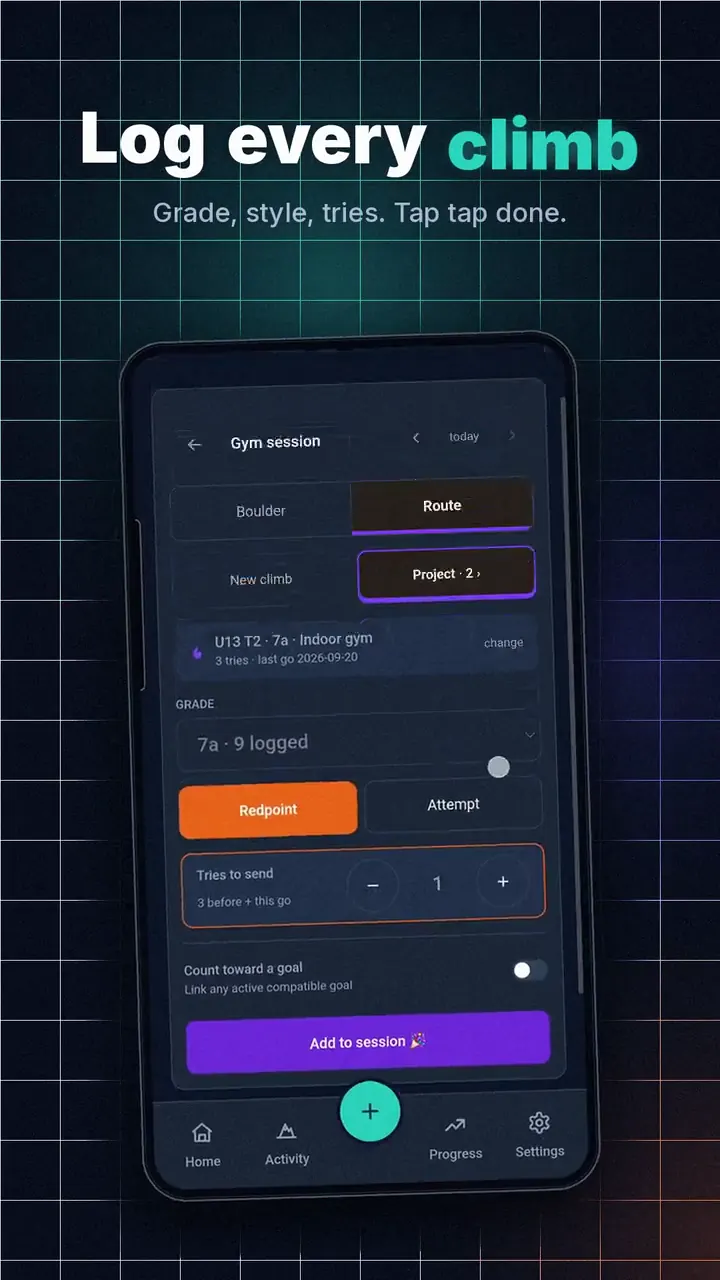
In Gym session, enter the grade, result and tries. Tap Add to session to keep the climb in your current session.
3. Finish and review
Tap Finish session (1 climb) to see the Session logged recap. Your climb then appears in Ascents, and you can return after your next session to build your record.
Looking specifically for gym sessions? See the indoor climbing logbook.
From the blog: What I track in my climbing logbook.
No logbook yet? This is one.
You do not need a climbing history to start. Log your next climb and it becomes part of your record. Nothing to import and no connected app or wearable needed. As you log more sessions, you can look back at what you climbed; deeper Performance views require more data.

Your gym does not have an app. Be your own.
Most gyms never built one, and the ones that did forget you the moment you leave. Log your indoor sessions here instead. Gym problems do not have names, so ours do not need one: log the grade and the session, and that is enough. When a problem turns into something you keep coming back to, give it a name and it becomes a project. Your indoor climbing gets its own grade pyramid, so the work you do on plastic actually counts.

Already keep a logbook? Bring it.
Connect theCrag once and new ascents sync on their own, nothing to upload again. Climb on Mountain Project? Export your ticks and drop in the CSV. Keep your own spreadsheet, like most of us did for years? Upload it. Your history arrives with its grades and styles intact, and joins whatever you log from here.

See the journey, not just the list.
A logbook that only lists your sends hides the best part. RoxClimbs draws your grade pyramid, your progression over time, your personal bests, and your top crags by year, indoor and outdoor kept strictly separate. It is easy to get lost in what you cannot climb yet and forget where you started. This is the page that remembers.

Every project gets its story.
Try a route and fall? Log the attempt. Every try is counted, and when the send finally comes the whole fight is on one page: first try to redpoint, with the conditions you did it in. Projects are where the long battles live. The logbook is where the wins land.

The logbook theCrag recommends.
RoxClimbs is the first app built on theCrag's Personal Logbook API, and theCrag lists it in their Recommended Apps. Connect once and new ascents sync on their own, attempts included, and a sync never overwrites an edit you made by hand.
FAQ
Questions climbers ask
I have never kept a logbook. Is this for me?
Yes. Log your first send and you have one. Importing from somewhere else is optional, not the starting point.
Can I log indoor climbing?
Yes. Indoor sessions log without naming anything, because gym problems rarely have names. Name one only when it becomes a project. Indoor gets its own grade pyramid, kept separate from outdoor.
My gym has no tracking app. Can I use this instead?
That is exactly what it is for. Log your sessions and grades here and your indoor progress lives with the rest of your climbing rather than disappearing when you walk out.
Does theCrag sync automatically?
Yes. Connect your theCrag account once and new ascents sync on their own. You can also upload theCrag's CSV export.
Can I import from Mountain Project?
Yes. Export your ticks as CSV from your Mountain Project profile and upload the file. Grades and styles map automatically.
Can I keep using my spreadsheet?
You can upload it, and most people stop needing it once the charts do the work.
Is my data locked in?
No. You can export everything you have put in at any time, and deleting your account removes your data.